Facebook Lead Ads That Actually Reach Your Sales Team
Facebook lead ads are the fastest way to generate leads on Meta: a prospect taps your ad, an instant form opens with their details pre-filled, and they submit in seconds. No landing page, no page-load drop-off. That speed is why real estate brokerages, travel agencies, and consultancies across the UAE spend most of their ad budget on them.
The problem starts one second after submission: Meta stores the lead, and your sales team does not see it.
What Meta Lead Ads and Instant Forms Are
Meta lead ads (the format behind instant forms on Facebook and Instagram) collect a prospect's name, phone number, email, and any custom questions you add, all inside the Meta app. Because the form pre-fills from the person's profile, completion rates are high and cost per lead is low compared to driving traffic to a website form.
The trade-off: the lead data lands inside Meta's ecosystem, not yours. By default you have two ways to get it out.
- Open Meta's Leads Center and check manually.
- Download a CSV from the page or Ads Manager and distribute it by hand.
Neither happens in real time. Both depend on someone remembering to look.
The Follow-Up Gap
The pattern repeats in account after account: strong campaigns, healthy cost per lead, disappointing conversions. The leads are not bad. They are late.
A lead sitting in Meta's Leads Center is invisible to the agent who is supposed to call it. CSV exports get downloaded once a day, sometimes once a week. By the time the file reaches a salesperson, the prospect has enquired with three competitors and answered the one that called first. Speed to lead is the single biggest controllable factor in lead-gen conversion, and the default Meta workflow works against it.
Middleware tools like Zapier patch the gap, but they add a monthly cost, a per-form setup step, and a silent failure mode: when a Zap breaks, leads stop flowing and nobody notices until the pipeline runs dry.
How LeadNudge Connects Facebook Leads to CRM
LeadNudge takes a different approach: one connection at the page level, not per form.
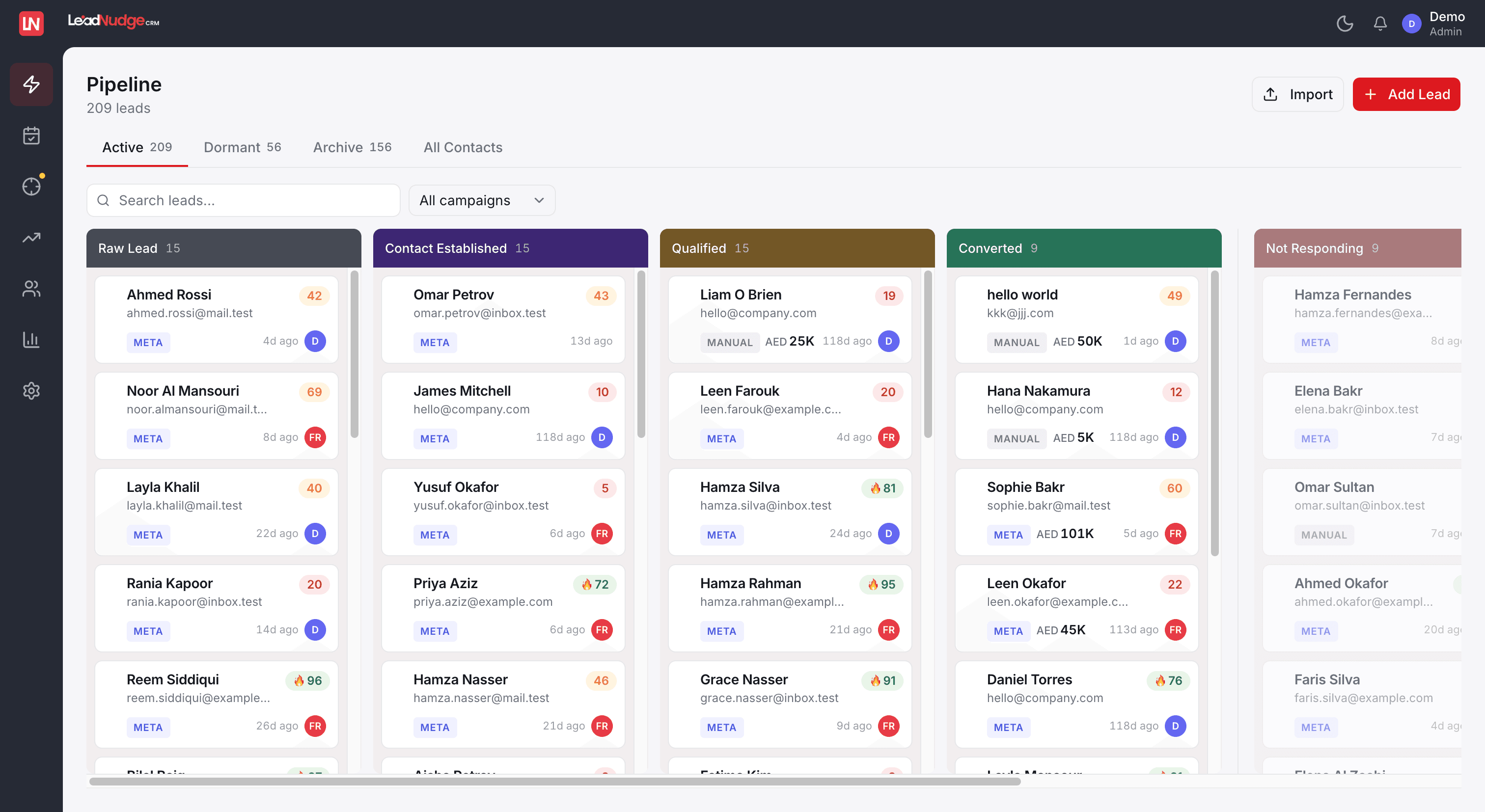
You connect your Facebook page to LeadNudge once. LeadNudge subscribes to Meta's page-level webhook, which means Meta pushes every lead to LeadNudge the moment the form is submitted. Every instant form on the page is covered automatically: the forms you run today, the forms your agency launches next month, the form a media buyer spins up for a weekend push. Nothing to map, nothing to reconnect.
What that removes from your stack:
- No Zapier or middleware subscriptions
- No per-form integrations that break silently
- No CSV downloads or manual imports
- No duplicate records: LeadNudge deduplicates leads automatically on ingest
Leads from your website flow in the same way. A lightweight JS snippet captures website form submissions and sends them into the same pipeline, so paid social and site enquiries live in one place. If you run lead gen across multiple channels, our lead management software overview covers how the full pipeline fits together.

What Happens in the First 60 Seconds After Capture
Capturing the lead is step one. LeadNudge is built around what happens next.
Scoring. Every lead gets a score from 0 to 80 the moment it arrives. The score is 70% deterministic (source, stage, freshness, contact completeness, deal value) and 30% AI, and it learns from the patterns of leads that actually convert. Your team sees at a glance which of this morning's 40 leads deserve the first call.
Enrichment. LeadNudge enriches company and contact data automatically on ingest, so agents open a record with context, not just a name and a number.
Assignment. Leads route to agents by round-robin or by campaign, so a lead from your Downtown Dubai campaign can go straight to the agent who covers Downtown Dubai. Real estate teams can see how this maps to their workflow on our real estate CRM for Dubai page.
First-contact drafts. LeadNudge drafts a first-contact message from the lead's actual form answers, so the opening message references what the prospect asked about instead of a generic script.
SLA alerts. If a lead is not contacted within your configured window (8 hours by default), the team gets an automatic alert, in-app and by email. Leads stop slipping through because someone was in a viewing or off shift.
Close the Loop Back to Meta
Real-time capture fixes the front half of the problem. The back half is telling Meta which leads turned into customers. When a lead reaches a qualifying stage in your pipeline, LeadNudge fires that event to Meta's Conversions API natively, so Meta optimizes ad delivery toward people who resemble your actual customers rather than anyone willing to fill a form. That closed loop is covered in detail on our conversion signals page.
Reporting That Matches Your Ad Account
Because every lead enters with its campaign, ad set, and ad attached, LeadNudge reports cost per lead at each level, with ad spend shown in AED next to pipeline outcomes. You see which ad produced conversions, not just which ad produced form fills.
FAQ
Common questions.
Stop Losing the Leads You Already Paid For
Every lead sitting unread in Meta's Leads Center is ad spend you have already committed. Connect your page once and every future lead reaches your team in real time, scored, assigned, and on the clock.
10-day free trial · Full access · No credit card required